Knowledgebase article 107
Change Time Zone for Office 365
The following procedures are for changing the Time Zone settings within Office 365 to reflect the correct time zone for Calendar and Meeting schedules.
You can change the time zone in Office 365 by following steps:
- Sign in to Office 365 with your work or school account.
- On the top navigation bar, click
Settings
to open the Settings pane, then click Language and time zone.
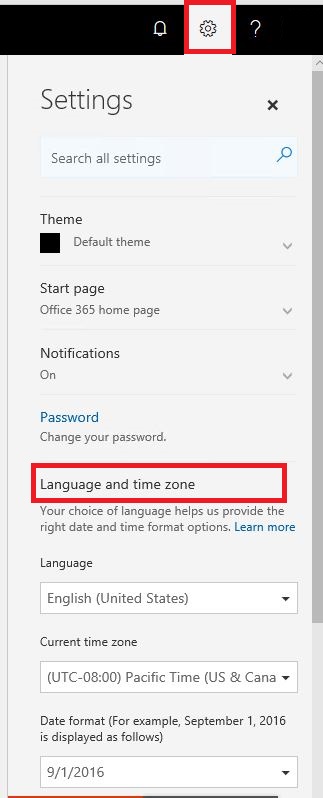
- Under
Language and time zone, select your language from the list, make changes to the time zone and time displays as well. Then click
Save.
For more information you can refer to Change your display language and time zone in Office 365 for Business.
Microsoft
Microsoft 365
Office
Office 365
Time
Time Zone
Group I.T. HelpDesk
Last modified Nov 19, 2024
Type Public
Viewed 259